As an SEO Writer, I stay up-to-date with the latest SEO practices and industry insights to craft content that is search-optimized, credible, and genuinely valuable, designed to perform at its best on SERPs.
Collaborator

Copilot vs ChatGPT: Differences and Benefits for Business
Have you ever wondered whether to choose Microsoft Copilot or ChatGPT for your everyday work? Both are commonly used to search for information, draft content, and even analyze data. However, they work differently, and each has its own strengths.
Broadly speaking, Microsoft Copilot is a good fit if you work mostly in Microsoft apps like Word, Excel, and PowerPoint. ChatGPT, on the other hand, is more flexible across a range of needs, from brainstorming ideas to processing information and tackling more complex tasks.
So, what are the differences between Copilot and ChatGPT? Which one suits your personal or business needs better? This article covers the Copilot vs ChatGPT differences in full, along with brand optimization strategies to help you show up on both AI platforms. So read on to the end!
Microsoft Copilot and ChatGPT at a Glance
Microsoft Copilot is an AI assistant from Microsoft that was introduced in 2023 through Bing and Microsoft Edge. Today, Copilot is also integrated with apps such as Word, Excel, PowerPoint, Outlook, and Teams.
Its popularity keeps growing, with more than 100 million monthly active users across platforms, and around 70% of top global companies already hold Copilot licenses. In addition, Microsoft 365 Copilot has reached roughly 20 million paid users, an increase of 33% in a single quarter.
Meanwhile, ChatGPT is an AI assistant from OpenAI that launched in November 2022 and is now used by more than 1 billion weekly active users worldwide. ChatGPT is also widely used as an assistant for all kinds of work, from writing and doing research to coding and generating images.
Differences between Microsoft Copilot vs ChatGPT
The differences between Microsoft Copilot and ChatGPT can be seen in their features, pricing, research capabilities, integrations, and even task automation. Here is a comparison of the two based on the aspects most relevant to business needs.
Components | Microsoft Copilot | ChatGPT |
| Features | Helps with work through AI features and compatible Microsoft apps. | Supports conversation, research, writing, analysis, and content creation. |
| Pricing | Free and paid options are available depending on the product and license. | Free and paid options are available, with different usage limits. |
| Grounding & Citation Approach | Can include sources in certain search and answer experiences. | Can cite sources when search features or external sources are used. |
| Research Capability | Supports information search and research in certain experiences. | Supports web search and deep research, depending on feature availability. |
| Answer Quality | Integrated with the Microsoft work context in products that support it. | Flexible for a wide range of needs and task types. |
| Data Analysis | Supports analysis through Copilot features and compatible Microsoft apps. | Helps process files, analyze data, and explain findings. |
| Ecosystem & Integration | Closely connected to Microsoft products. | Supports various features and integrations depending on the plan and configuration. |
| Coding Capability | Helps write and explain code through the available Copilot experiences. | Helps write, review, explain, and fix code. |
| Memory | Depends on the product, account, and settings used. | Available on subscription plans that support memory features and their settings. |
Please keep in mind that features, pricing, and usage limits may change depending on the plan, region, account type, and configuration. Therefore, the comparison above is best used as a general overview, not a substitute for checking the details of the plans available to you.
Read also: Generative Engine Optimization (GEO): Definition & Strategies 2026
Detailed Differences Between Microsoft Copilot and ChatGPT
The table above gave a general overview of the differences between Microsoft Copilot and ChatGPT. Below, we summarize a more detailed differences between Copilot and ChatGPT, along with explanations.
1. AI Models and Core Capabilities
Is Copilot basically ChatGPT under a different name? In terms of features and capabilities, mostly yes. This is because both use OpenAI’s latest models, or as the summary puts it, “Same brain, different body.” However, Copilot now also uses Claude models and Microsoft’s own models, while ChatGPT uses only OpenAI models.
2. Features and Integration
Copilot AI can be integrated with the Windows OS, Edge, and Bing, and can be used in Word, Excel, PowerPoint, and Outlook through a paid plan. In addition, through Microsoft Graph, Copilot can read emails, files, and conversations on the Microsoft Teams platform to help summarize the information in them.
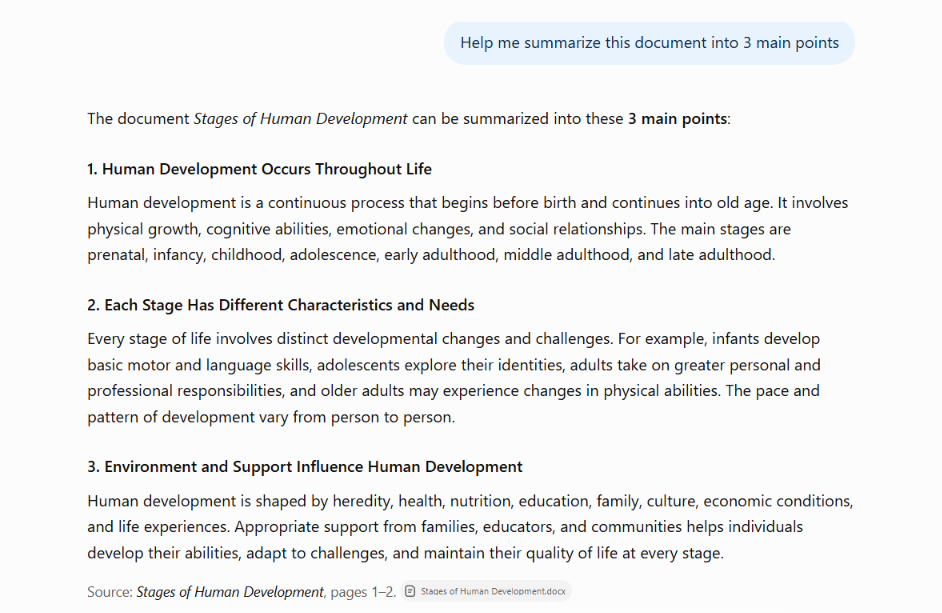
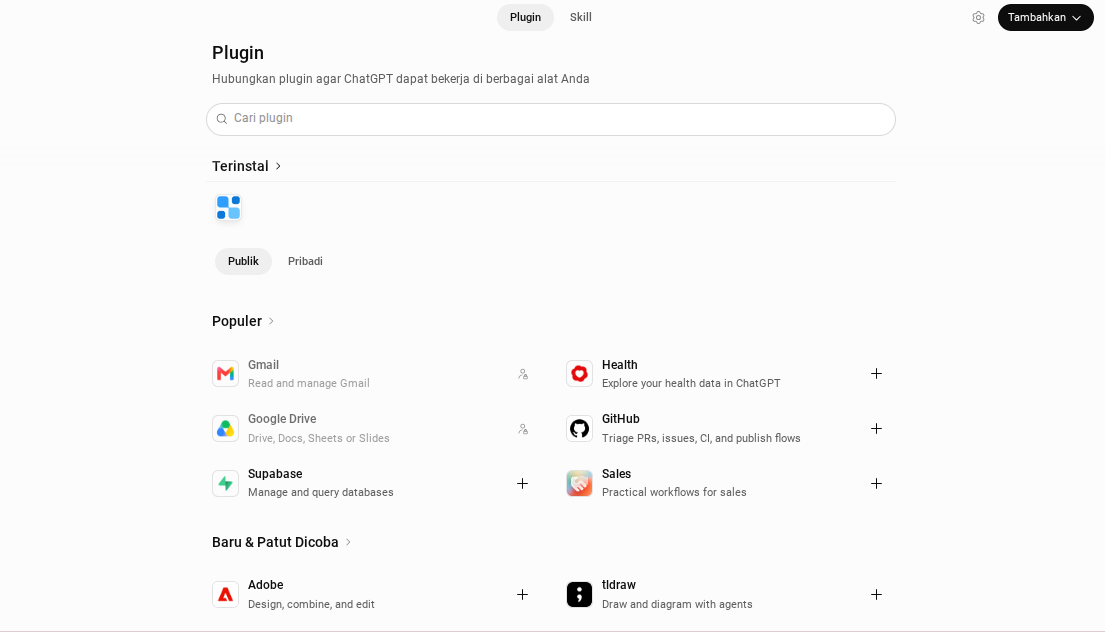
Meanwhile, in terms of features, ChatGPT is not tied to a single office suite and offers better web and news search as well as custom chatbots. The platform also connects to thousands of apps through third-party apps, making it more flexible for teams outside the Microsoft ecosystem.
Read also: Gemini vs ChatGPT for Business: Which to Choose?
3. Research, Citations, and Reliability
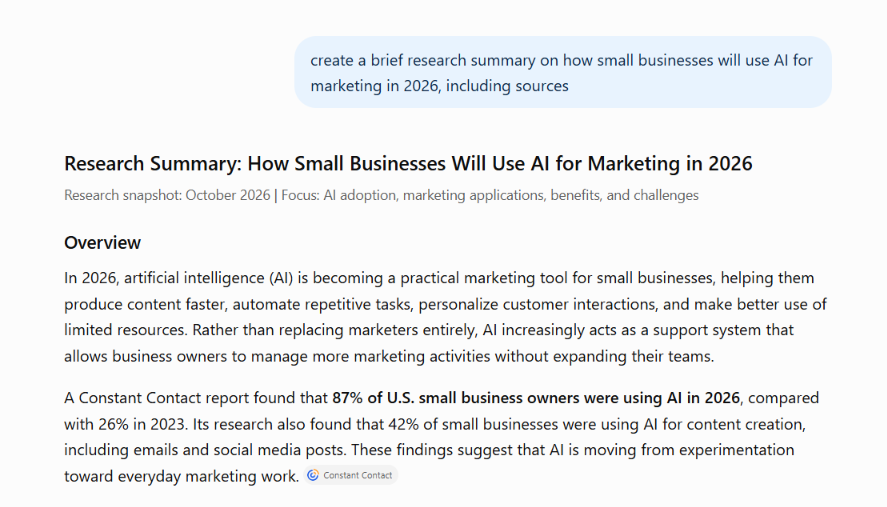
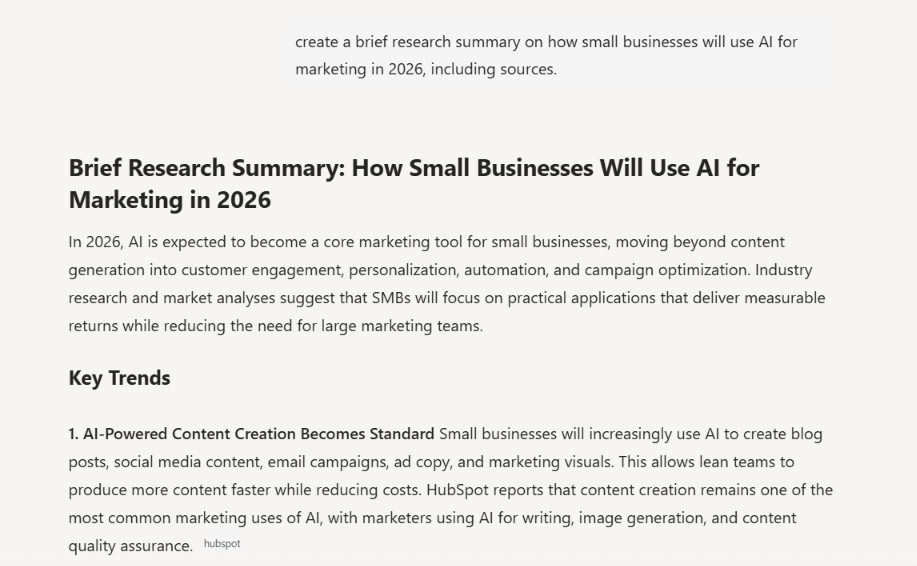
Copilot’s web answers are sourced from Bing with numbered citations, while ChatGPT decides on its own when it needs to search the web.
In a comparison test, ChatGPT put together a concise brief, while Copilot provided broader source coverage. Even so, both can still be wrong, so thorough fact-checking of both AIs’ responses is still necessary.
Here is the result from ChatGPT:
Here is the result from Microsoft Copilot:
4. Data Analysis and Coding
Both ChatGPT and Copilot can help analyze data, summarize spreadsheets, and handle a variety of coding tasks. The difference lies in how they work and the context in which they are used.
Copilot makes it easy to analyze data directly in Excel, while ChatGPT can help process data, find patterns, and even write code tailored to your needs. For coding, both can also be used to build simple applications, such as a UTM link builder.
Here is ChatGPT’s answer:
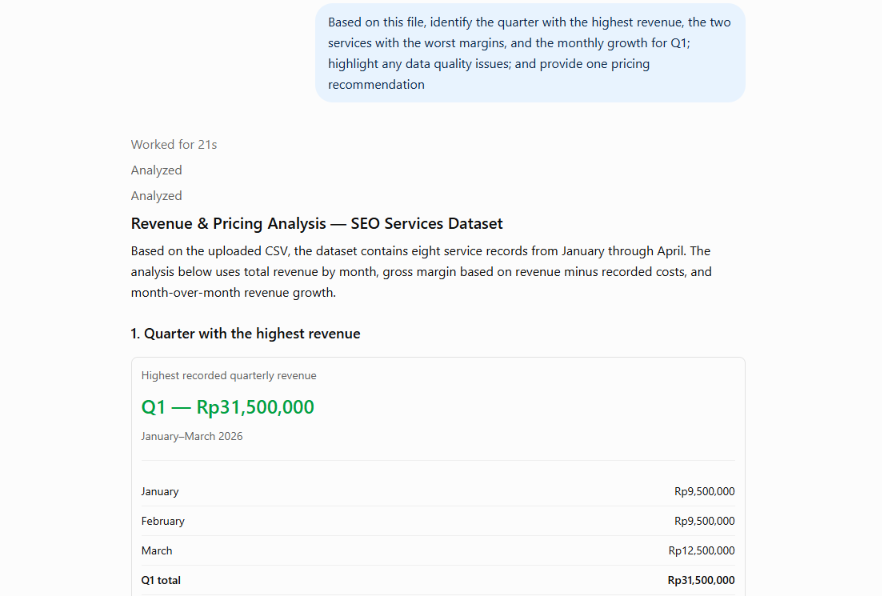
Here is Copilot’s answer:
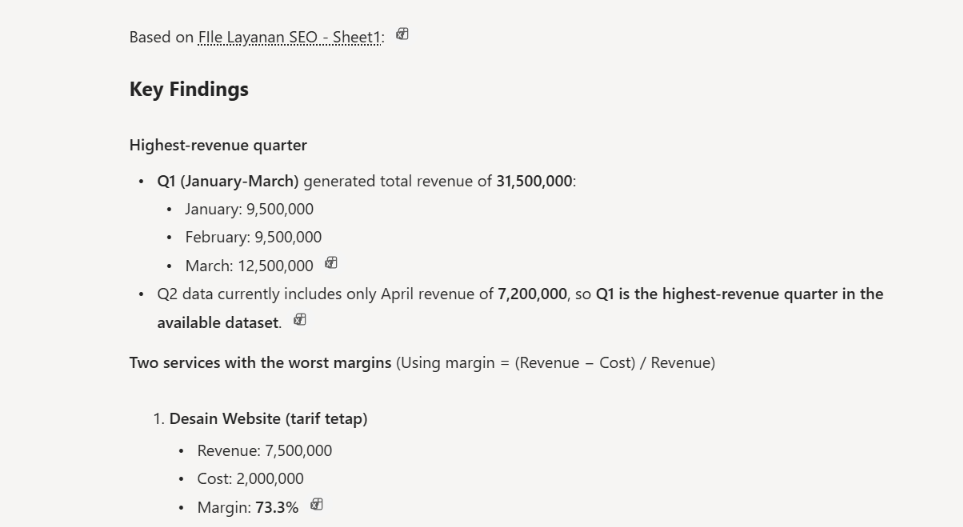
5. Asset Creation
In testing AI image generation, both ChatGPT and Microsoft Copilot proved capable of producing visuals based on the text instructions given. However, each showed different strengths.
ChatGPT, through GPT Image 2, tends to follow instruction details better, from composition and visual elements to the characteristics of the requested image. This makes ChatGPT appealing for needs that call for specific visual results that match the user’s direction.
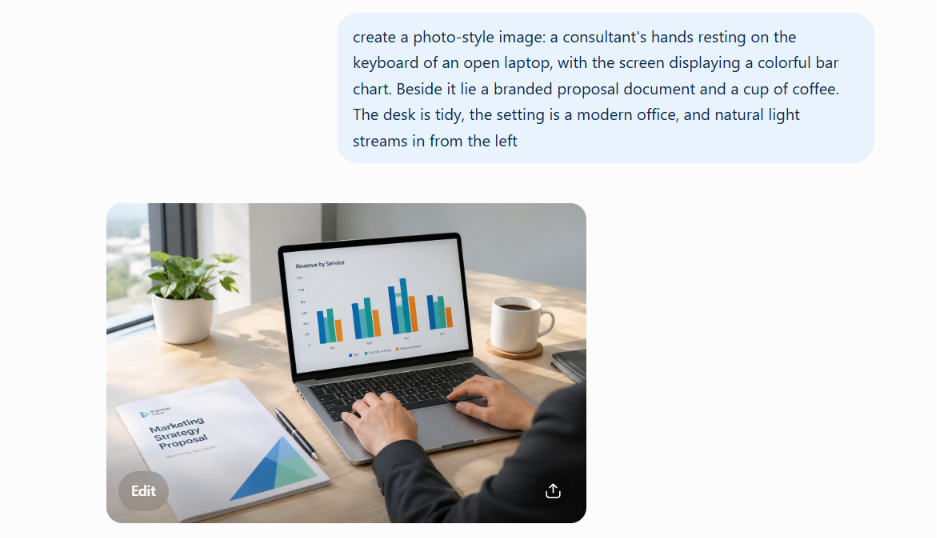
On the other hand, Microsoft Copilot can produce images with a clean and fairly tidy look. Its results can be a good option for creating supporting visuals for content or other creative needs. That said, the final image quality still depends on the clarity of the prompt, the complexity of the instructions, and the type of visual you want to create.
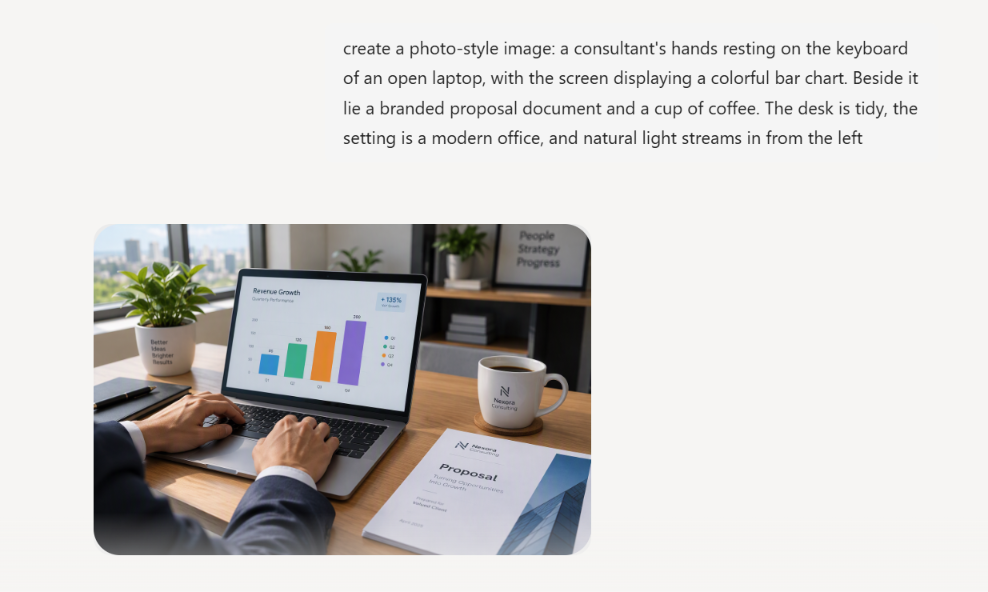
Read also: What Is Answer Engine Optimization (AEO)? A Guide to Optimizing Business
6. Subscription Plan Pricing
ChatGPT offers several plan options that can be matched to users’ needs, including the Free plan, ChatGPT Go, ChatGPT Plus, and ChatGPT Pro.
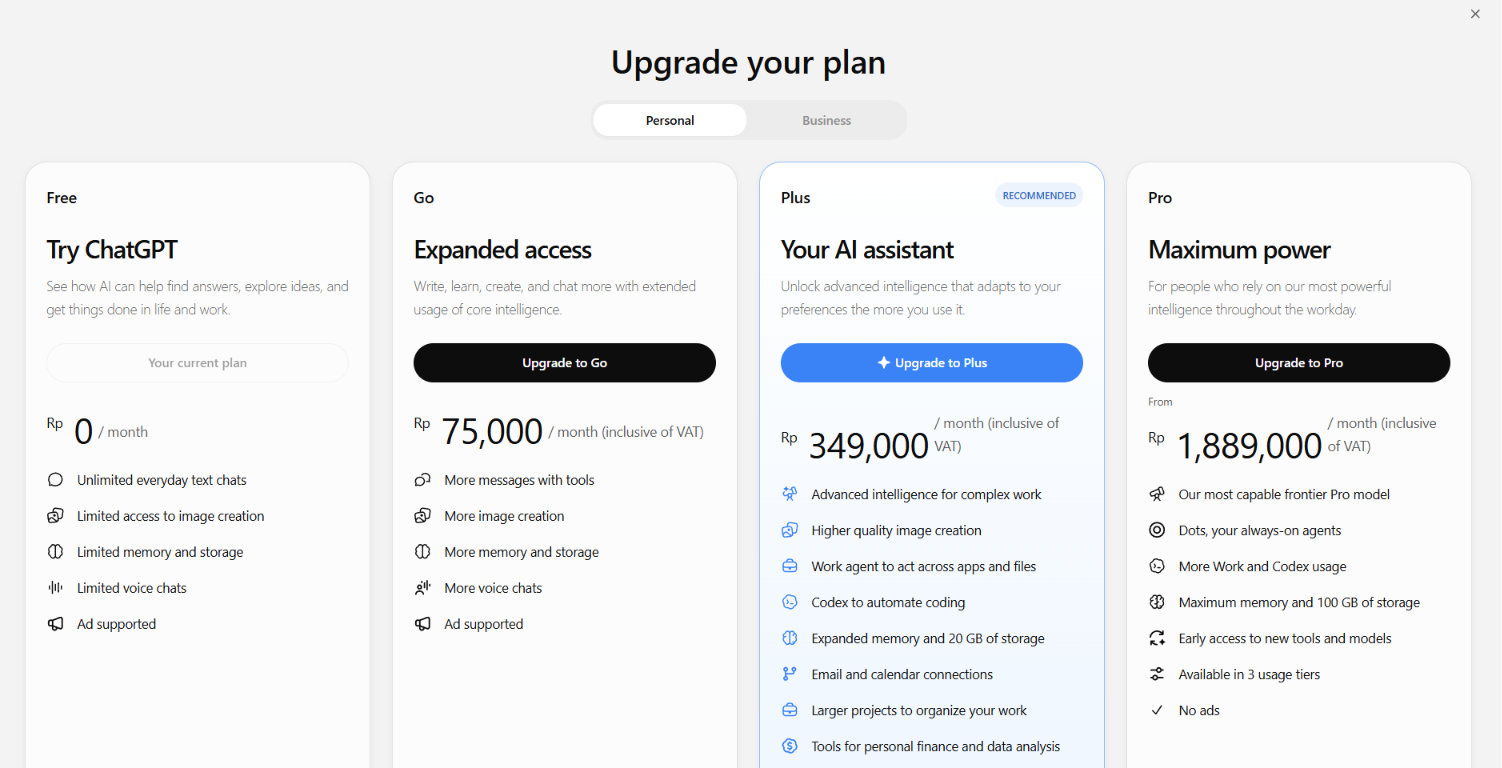
The free plan costs nothing and covers the basics, though some features have usage limits. If you need more room, ChatGPT Go is Rp75,000 per month and adds capacity for messages, image creation, file uploads, and memory.
Meanwhile, ChatGPT Plus is shown with a promotional price of Rp0 per month for a one-month free trial, with the regular price of Rp349,000 per month crossed out in the image. For users who need even higher capacity, ChatGPT Pro is available at Rp1,889,000 per month.
On the other hand, Microsoft Copilot offers Microsoft 365 Personal, Family, and Premium. Unlike simply choosing an AI service, these plans include a Microsoft 365 subscription with benefits tied to productivity apps and Copilot usage.
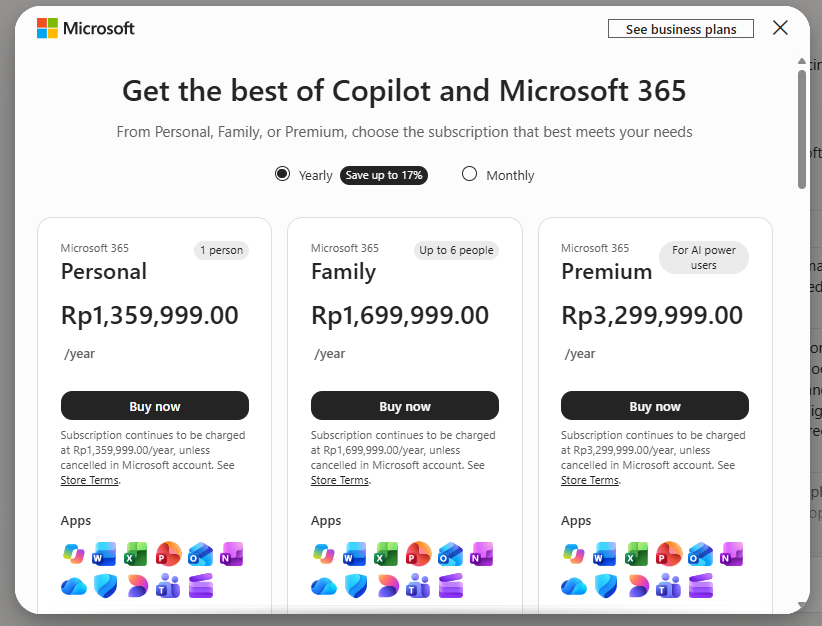
Microsoft 365 Personal is priced at Rp1,359,999 per year for one person, while Microsoft 365 Family costs Rp1,699,999 per year for up to six people. Microsoft 365 Premium is offered at Rp3,299,999 per year and includes premium benefits for users with higher needs.
Microsoft Copilot vs ChatGPT: Which Is Better for Business?
Which is better: Copilot or ChatGPT? The answer depends on your business needs. For teams that work in Word, Excel, and Teams, Copilot can speed up work, while ChatGPT is more flexible for teams that may need functions from a variety of tools. And there’s no harm in using both so they complement each other.
Beyond supporting productivity, both platforms are worth watching as part of a shift in how people search for information. Given the sheer number of users who look for information or brand recommendations through AI, does your brand have a chance of showing up in their answers?
Read also: AI Referral Traffic: Definition, Benefits, and How to Measure It
Is It Better to Get AI Citations & Mentions from Copilot or ChatGPT?
For businesses that want to strengthen their AI visibility, planning a strategy for AI citations and mentions is becoming quite important in today’s AI era. That’s because both can serve as indicators for understanding how a business appears in AI-based search experiences.
Having your brand appear in Copilot AI can help a business reach more users who use the platform to look for information and compare solutions. This platform is worth monitoring, especially if your target audience heavily uses the Microsoft ecosystem or searches for information related to professional needs.
Meanwhile, citations and mentions in ChatGPT can help introduce your brand when users explore their needs, ask for recommendations, or consider product alternatives.
Strategies to Help Your Business Earn Citations and Recommendations in Copilot and ChatGPT
To improve the chances of earning citations and brand mentions in AI Search, businesses need to evaluate their brand visibility, optimize content quality, and make sure the information they present is relevant and consistent.
As a first step, you can run a check through free AI Visibility Audit by cmlabs to identify where your brand appears, which sources AI cites, and opportunities for improvement.
Next, you can apply optimization strategies that help AI understand the context and credibility of your brand’s information. If you’re unsure where to start, leave it to the AI Search Optimization (GEO/AEO) service by cmlabs.
We can help your business optimize its visibility across the AI platforms you are targeting. Because every business faces different visibility challenges, the optimization strategy needs to be tailored to your industry, audience, and business goals.
Book a consultation with the our marketing team to map out your brand’s AI Search needs, pinpoint the right optimization steps, and keep tabs on your visibility across Microsoft Copilot, ChatGPT, and other AI platforms
Ready to get found? Evaluate your visibility and build the right optimization strategy so more customers can discover your business.

Risca Fadillah
Thank you for taking the time to read my article! At cmlabs, we regularly publish new and insightful articles related to SEO almost every week. So, you'll always get the latest information on the topics you're interested in. If you really enjoy the content on cmlabs, you can subscribe to our email newsletter By subscribing, you'll receive updates directly in your inbox. And hey, if you're interested in becoming a writer at cmlabs, don't worry! You can find more information. here So, come join the cmlabs community and stay updated on the latest SEO developments with us!
Subscribe to Our Newsletter
Enter your email to receive news from us