As an SEO Writer, I stay up-to-date with the latest SEO practices and industry insights to craft content that is search-optimized, credible, and genuinely valuable, designed to perform at its best on SERPs.
Collaborator

How to Reply to Google Reviews: A Complete Guide

If your business serves a specific local area, such as a clinic, restaurant, repair shop, or other local service, Google reviews matter a lot. From a local SEO perspective, the number and rating of reviews help determine how prominently your business shows up in search results and on Google Maps. Through Google Business Profile, a free tool from Google, you can also reply to the reviews your customers leave.
Don’t know how to reply to Google reviews? Don’t worry, let’s find out how in this article!
Why Are Google Reviews Important for Businesses?
The reviews section influences which business customers choose and how easily yours can be found. For local businesses, reviews are more than a place for customers to leave comments. They are also a crucial factor affecting your brand’s visibility in search.
That is why it is important for businesses to practice social listening, and one way to do that is by regularly monitoring their reviews on Google. If you’re not sure how to see your Google reviews, we’ll walk through that in this article. But, first, understand why businesses should pay attention to Google Reviews:
- Customers will almost always look up reviews before buying something or visiting a place for the first time.
- Few customers are willing to choose a business with a rating below 4 stars and unsatisfying reviews.
- Reviews are also one of the signals Google uses to rank businesses in local search and on Google Maps. The more active and relevant the reviews coming in, the better your chances of appearing when potential customers search for you.
How to See Customer Reviews on Google
So the question is, how to see your Google reviews? In general, there are three platforms you can use to view reviews, that is Google Search, Google Maps, and Google Business Profile Manager.
Whichever platform you use, make sure you’re logged in with the Google account linked to your business profile so you can both read and reply to reviews.
Here’s how to see customer reviews from each Google feature:
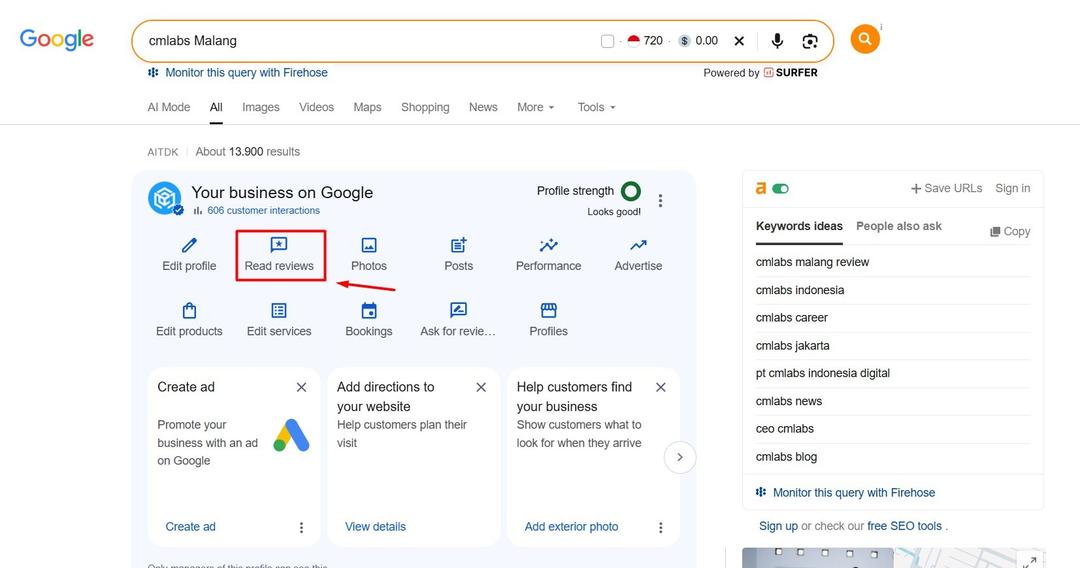
How to See Reviews on Google Search
- Log in to the Google account that manages your Business Profile.
- Search for your business name on Google. Adding the city name or address makes it easier.
- On the business profile panel in the search results, click the star rating, the number of reviews, or the reviews section.
- Scroll to read customer reviews, then reply if needed.
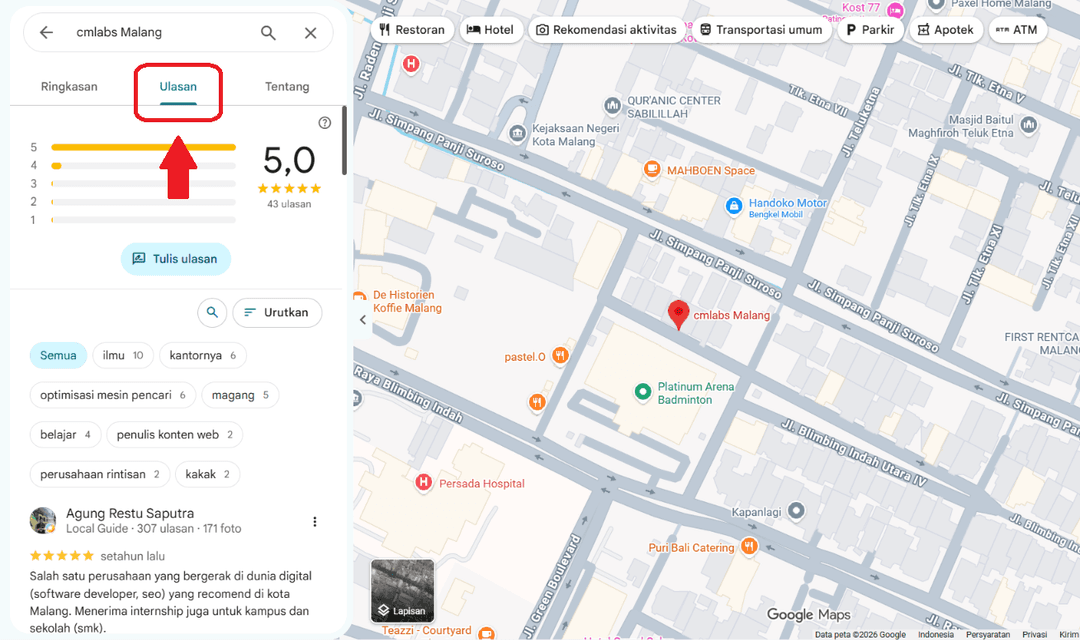
How to See Reviews on Maps
- Open Google Maps and log in with the same account.
- Search for your business name, then select the correct location.
- Click the Reviews tab.
- Read, sort, and reply to reviews from that page.
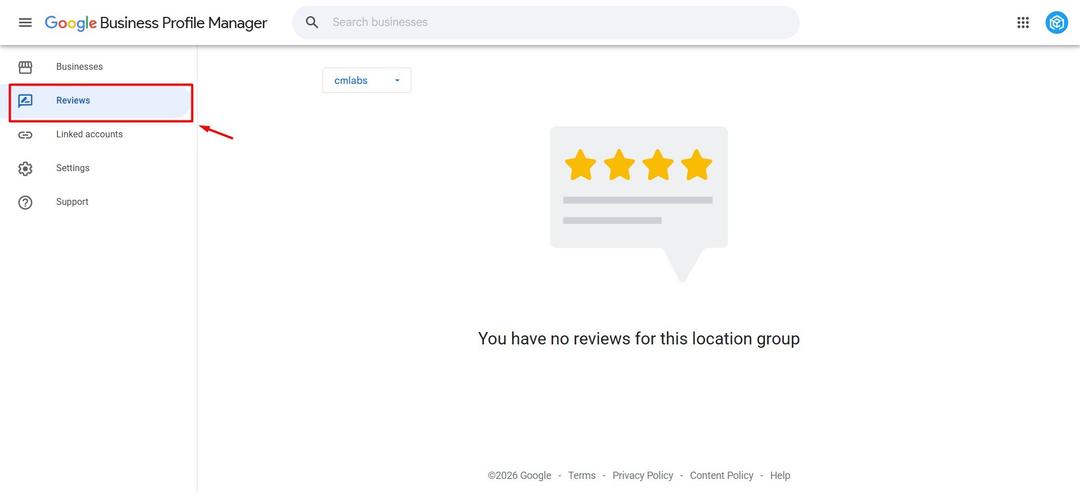
How to See Reviews on Business Profile Manager
- Open your Google Business Profile account.
- Select the business or location you want to check.
- Open the profile management menu, then choose the reviews section.
- Read and reply to reviews directly from there.
If your business doesn’t show up or the reply button isn’t available, you’re most likely logged in with the wrong account or don’t yet have owner or manager access. For businesses with multiple branches, make sure the address is correct before replying.
Read also: Example of Customer Loyalty Programs to Attract Repeat Orders
How to Reply to Reviews on Google Business Profile
Here’s how to reply to a Google review through Google Business Profile. Your reply appears publicly beneath the review and can be read by everyone. Below are the steps for replying on a computer and on a phone.
How to Reply to Google Reviews on a Desktop
- Log in to the Google account linked to your business.
- Open your Business Profile or search for your business name on Google Search.
- Click Read reviews.
- On the review you want to reply to, click Reply.
- Write your reply in the box that appears, then click Reply to publish it.
How to Reply to Google Reviews on a Phone
- Open the Google Maps app and log in with the account that manages your business.
- Tap the Business tab at the bottom right.
- Tap Reviews.
- Select a customer review, then tap Reply.
- Write your message, then send it.
Tips for Replying to Google Reviews
Keep in mind that when you reply to reviews, you’re also building your business’s reputation, strengthening its digital visibility, and keeping your business profile active in Google’s eyes.
Here are some effective tips for replying to customer reviews:
- Respond to what the review actually says, not with a template.
- Mention the customer’s name and one specific thing from their review.
- Give a personal thank-you for positive reviews.
- Stay professional when replying to negative reviews.
- Protect customer privacy. Don’t mention order details or personal data.
- Reply promptly, but don’t rush. Try to answer reviews within one week.
- Write for two readers: the customer who left the review and the next potential customer.
- Set internal rules on who replies, the tone of voice, and when a complaint should be escalated.
Read also: Community Marketing: Definition, Types, Strategies, & Benefits
How to Respond to a Bad Review on Google
Sometimes a customer just isn’t satisfied, and it shows up in their review. So, knowing how to reply to a bad review on Google is important, and your response should always be professional, calm, and measured.
One thing to keep in mind is that business owners can’t delete customer reviews. So if you’re wondering how to delete a Google review, you can’t do it yourself.
What you can do is report reviews that violate Google’s policies, such as spam, fake content, or abusive language. Whether a review gets removed is still Google’s decision.
However, if a customer’s negative review is still reasonable, it’s best to face it and respond to their disappointment. The main principles of how to reply to a bad review on Google are to stay calm, acknowledge and validate the customer’s experience, apologize for the inconvenience, and then move further communication to a private channel by including a contact they can reach.
Avoid arguing, blaming the customer, or promising things that aren’t certain. Also make sure you don’t reply while emotional, and try to reply within 24 to 48 hours.
Do’s | Don’ts |
| Thank the customer for their feedback and acknowledge their experience | Argue or accuse the customer of lying |
| Apologize for the customer’s inconvenience | Blame the customer in public |
| Include a direct contact to continue the conversation | Promise results you may not be able to deliver |
| Keep your reply short and focused on the points of the complaint | Copy and paste the same reply to every review |
| Reply to reviews within 24 to 48 hours | Reply while you’re emotional |
Here are some templates for replying to a bad review on Google that you can try:
1. Replying to a Slow Service Complaint
“Hello Ms. Joe, thank you for your feedback, and we’re sorry for the uncomfortable wait during your visit. We’d like to learn more about what happened. Could you please contact us at [number] so we can help? — [Name/Code Name], [Position]”
2. Replying to a Product Complaint
“Hello Mr. Arnold, we’re sorry your order didn’t turn out the way you expected. We’d like to understand more about what happened and find a solution. If you’re willing, could you contact us at [number] so our team can quickly give you the best solution possible? — [Name/Code Name], [Position]”
3. Replying to an Unfriendly Staff Complaint
“Hello James, thank you for visiting [Store Name] and taking the time to share your feedback. We’re sorry about the unpleasant experience with our team. We’ll follow up on this feedback right away so it doesn’t happen again. If you’re willing, please contact us at [number] so we can hear the full story. — [Name/Code Name], [Position]”
Read also: Competitor Analysis in AI Search: A Guide with Practical Tips
Monitor Reputation & Optimize Business Reviews with cmlabs!
Managing Google reviews, including replying to both good and bad ones, is an important step in building your business’s reputation. Even so, reviews shouldn’t be the only thing potential customers use to judge you.
Potential customers who want to be more certain will usually visit your business’s website to look for information about your services, profile, and experience. A website that is relevant, fast, and credible gives them a direct source of information from the business itself, so reviews are no longer the only basis for their judgment.
This is where we can help you optimize the relevance, performance, and credibility of your website with SEO Services by cmlabs.
cmlabs always optimizes from the root cause of what’s holding back your website and business, not just the symptoms. Our team of experts always builds strategies based on data and analysis, and every optimization process and result is clearly and neatly documented as a transparent report for you.
If your challenge is your business’s reputation, cmlabs also offers Media Placement & Backlink Services. We have 500+ trusted media domains that can increase your brand awareness while strengthening your business’s position on Google.
So, what are you waiting for? Strengthen your business’s reputation and visibility today by contacting our team to ask about our services or request a quote directly.

Risca Fadillah
Thank you for taking the time to read my article! At cmlabs, we regularly publish new and insightful articles related to SEO almost every week. So, you'll always get the latest information on the topics you're interested in. If you really enjoy the content on cmlabs, you can subscribe to our email newsletter By subscribing, you'll receive updates directly in your inbox. And hey, if you're interested in becoming a writer at cmlabs, don't worry! You can find more information. here So, come join the cmlabs community and stay updated on the latest SEO developments with us!
Subscribe to Our Newsletter
Enter your email to receive news from us