Google Updates Favicon Information in Its Documentation

Cover image: Google has updated its documentation related to favicons, making it more detailed than previous documents.
Google has provided additional information related to the rel attribute in its favicon documentation, making it more detailed than previous documents. Check it out here!
Key Takeaways
- Google has updated its documentation related to favicons.
- Previously, Google only outlined the rel attribute for favicons. In the latest version, Google details the rel attributes, making it more comprehensive.
- To display a favicon in search results, your website needs to meet certain criteria.
Google revised the favicon documentation by adding definitions as an answer to user questions about favicon and its uses.
This update certainly provides a better user experience by explaining the differences between the old version of the favicon and the latest one.
A favicon, or favorite icon, is a graphic that can be associated with a website and displayed in browsers tab, such as Firefox, Safari, and others.
This icon will appear in several areas, such as the Location column, next to the site name in the bookmarks list, alongside the site title on tabs, and next to the site feed.
You can include a favicon in Google search results if your site has a favicon.
What Differentiates the Old and New Favicon Documents?
Google has added several attribute details to extract favicon information. In the old version, Google only outlined the attribute information as follows:
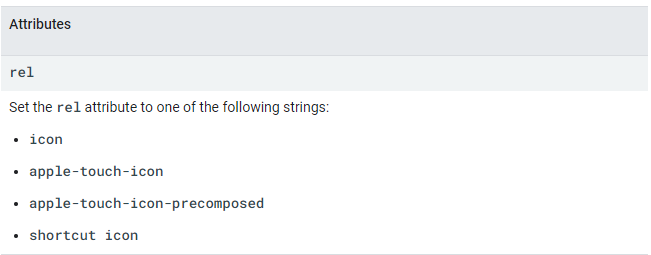
In the new document, Google provides details of the above attributes as follows:
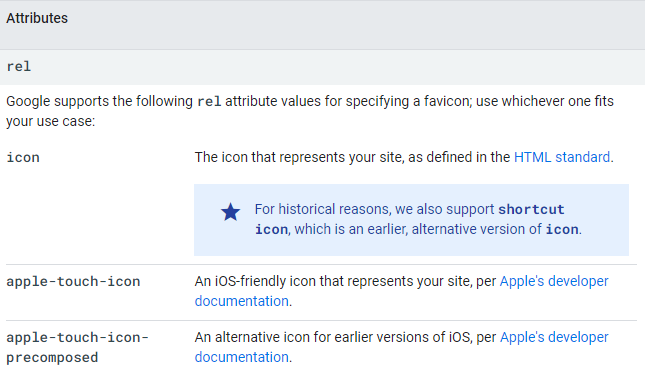
Google also provides an info box on the icon explaining that they support the shortcut icon, which is an alternative to the previous version's icon.
How to Display a Favicon in Google Search Results
To display a favicon in search results, your website must meet certain criteria.
The requirements that must be met are as follows:
- A site can only have one favicon. Each site that has a favicon is determined by the hostname.
- The favicon file must be crawlable by Googlebot-Image and the homepage of the site must be crawlable by Googlebot.
- Ensure the favicon visually represents the website's brand.
- The size of the favicon must be a square multiple of 48 pixels (48x48, 96x96, etc.) and meet the image format requirements according to the browser.
- Ensure not to frequently change the favicon URL.
- Google does not support favicons containing symbols of hate, pornography, or other inappropriate content and will automatically replace them with a default icon.
If your website meets the above requirements, you can follow these steps to display the favicon:
- Ensure to create a favicon that meets the above requirements.
- Add a <link> tag to the header of the homepage of your website with syntax like the following: <link rel="icon" href="/path/to/favicon.ico">.
- Google will update your favicon every time it crawls the homepage. Updates may take a few days or longer before appearing in search results.
If you change the favicon of your site, make sure to request Google to index the homepage of your website.
Article Sources
As a dedicated news provider, we are committed to accuracy and reliability. We go the extra mile by attaching credible sources to support the data and information we present.
- FeedBurner Help - https://support.google.com/feedburner/answer/78975?hl=en
- Google Search Central (archive) - https://web.archive.org/web/20240324072717/https://developers.google.com/search/docs/appearance/favicon-in-search
- Google Search Central - https://developers.google.com/search/docs/appearance/favicon-in-search#guidelines
For more information about cmlabs and our services, please contact us at:
E-mail :
marketing@cmlabs.coPhone : (0341) 475665
Risca Fadillah
As an SEO Writer, I stay up-to-date with the latest SEO practices and industry insights to craft content that is search-optimized, credible, and genuinely valuable, designed to perform at its best on SERPs.
Another post from Risca


Good SEO Is Good AIO? Google's Danny Sullivan & John Mueller’s Perspective on SEO for AI

More from cmlabs News -your daily dose of SEO knowledge booster
cmlabs x LPTUI Collaborated to Deliver an Online Psychotest Platform for a Government Program
cmlabs Won Bronze Medal & Top Outstanding Project at the Prestigious BRICS Industrial Innovation Contest 2025
cmlabs won a Bronze Medal & Top Outstanding Project at the BRICS Industrial Innovation Contest 2025 with Orion, an AI for data-driven marketing.
cmlabs Becomes Guest Speaker at BRI Group Meeting, Highlights the Importance of SEO for PR Corporate Branding
cmlabs participated as a Guest Speaker at the BRI Group meeting, discussing the importance of SEO in supporting PR and corporate branding.